
How to Add a CAPTCHA to Contact Form 7 in 2026 (Free reCAPTCHA Alternative)
Add a CAPTCHA to Contact Form 7 in five minutes — free for 10,000 verifications/month, GDPR-compliant, drop-in reCAPTCHA replacement. Full step-by-step for WordPress in 2026.


If your Contact Form 7 emails keep going to spam, or your CF7 inbox is filling with obviously fake messages, the problem isn't your email provider — it's your form. Bots submit CF7 forms thousands of times an hour, your site dutifully emails the contents, and your mail server treats those rapid-fire outgoing emails as suspicious. Fix the form and the email problem goes away with it.
The fix is a contact form with a CAPTCHA on it — one that blocks the bot before it ever submits, which stops the runaway outbound-email pattern that pushed your legitimate mail into junk in the first place. This guide shows how to add Prosopo Procaptcha to Contact Form 7 in a few minutes — free for the first 10,000 verifications per month, GDPR-compliant, and a drop-in replacement for the reCAPTCHA integration most CF7 setups come with.
Which contact form should have a CAPTCHA?
Every WordPress contact form should have one — CF7 is the most-installed and gets the most spam, but WPForms, Gravity Forms, Ninja Forms, Fluent Forms and the rest are just as exposed. The specific integration steps differ per plugin, but the general shape is the same: install a CAPTCHA plugin, get a site key, drop the CAPTCHA field into the form, verify server-side on submission. The rest of this article covers the CF7-specific flow; jump to Related at the bottom for the WPForms and other-plugin equivalents.
Why your Contact Form 7 emails go to spam
Three causes account for almost every "CF7 mail going to spam" complaint:
- Bots submitting your form generate sudden bursts of outbound email from your site. Mail providers (especially Gmail and Outlook) flag this volume pattern as suspicious and either drop the messages or send them to junk.
- Spammed contents include links and phrases that reputation-scoring filters mark as risky.
- A poorly-protected form means rate-limiting, SPF, DKIM, and DMARC alone aren't enough — the spam is being authored by your own site, so authentication still passes.
A CAPTCHA on the form stops 1 and 2 by stopping the bot from submitting in the first place. The legitimate-volume problem disappears, your sending reputation recovers, and CF7 mail starts arriving in inboxes again.
Contact Form 7 reCAPTCHA: three reasons to replace it
Contact Form 7 comes with a built-in Google reCAPTCHA integration, but in 2026 the default is quietly costing you. Three reasons to switch to a reCAPTCHA replacement for Contact Form 7:
- You're paying (or about to). reCAPTCHA is billed per assessment above 10,000/month. A single CF7 form on a moderately busy WordPress site crosses that threshold fast, at which point Google starts charging you for every submission — legitimate or bot.
- You're leaking user data to Google. reCAPTCHA drops third-party Google tracking cookies on every CF7 page load, feeds them into Google's ad-tech identifiers, and processes the data in the US. For any WordPress site with EU visitors that requires a consent banner, a DPA entry, and a Schrems II transfer basis before the form is even legal to serve.
- It's letting bots through anyway. Modern CAPTCHA-solving farms clear reCAPTCHA v3 image challenges for under $1 per 1,000 puzzles. Your CF7 inbox is still full of spam, you're paying Google, and your users are still being tracked. That's the worst possible position to be in.
Procaptcha is a drop-in Contact Form 7 reCAPTCHA alternative that's free for the first 10,000 verifications per month, GDPR-compliant, and installs in the same CF7 form-tag flow you already use. No shortcodes, no consent-banner rework, no ongoing bill.
Which CAPTCHA for Contact Form 7 should you use?
The best CAPTCHA for Contact Form 7 in 2026 is a privacy-first, non-Google option: reCAPTCHA sets tracking cookies without a valid GDPR lawful basis for many EU sites, hCaptcha still shows image puzzles that bots increasingly solve, and both charge for the volume of traffic a typical CF7 form receives once you cross the free tier. Procaptcha for Contact Form 7 is free for the first 10,000 verifications per month, needs no cookie consent banner, and drops into the existing CF7 form-tag flow — no shortcodes, no rewriting your forms.
If you already have a captcha contact form 7 setup with reCAPTCHA or hCaptcha and just want to swap it out, jump straight to the integration steps below.
What is Contact Form 7?
Contact Form 7 is one of the most popular and widely used form plugins for WordPress. It allows users to create simple and customizable contact forms for their websites with minimal effort. The plugin provides an intuitive interface where users can add and configure various form fields, such as text, email, radio buttons, checkboxes, and more.
Key features of Contact Form 7 include easy form creation using simple HTML markup, with support for multiple forms on a single site. The plugin also supports email notifications, allowing administrators to receive form submissions directly to their inbox.
Though Contact Form 7’s interface is minimalistic, it supports advanced options such as custom validation messages, file uploads, and form tags to personalize and extend functionality. The plugin is fully responsive, ensuring forms look good on all devices.
While Contact Form 7 is free to use, users can extend its functionality with a variety of third-party add-ons for features like PayPal integration, multi-step forms, and more. Though it’s relatively lightweight and doesn’t offer as many built-in features as some other plugins, Contact Form 7 is a solid choice for users seeking a simple, customizable form solution for WordPress.
Why Use Prosopo Procaptcha With Contact Form 7?
Prosopo is a specialist bot and agent trust platform. Every block comes with a reason, in plain words, on a proprietary detection engine with an open-source client stack. UK-incorporated, EU-processed, GDPR-native. It stops the abuse patterns WordPress form spam alone doesn't cover:
- Scraping
- Denial of inventory
- Credential stuffing
- Account takeover
- Click through rate/ad fraud
- Ticket scalping
- Black friday automation (and more general sale automation)
- Phishing attacks
- Loyalty programme automation
Prosopo also keeps visitor data out of Google's data controller chain for reCAPTCHA telemetry — the 2026 reCAPTCHA terms change reclassified Google as controller rather than processor.

How to integrate Prosopo Procaptcha with Contact Form 7
Install the Prosopo WordPress plugin
Register for a free account on Prosopo
Login to the Prosopo dashboard, and copy your site key and secret key
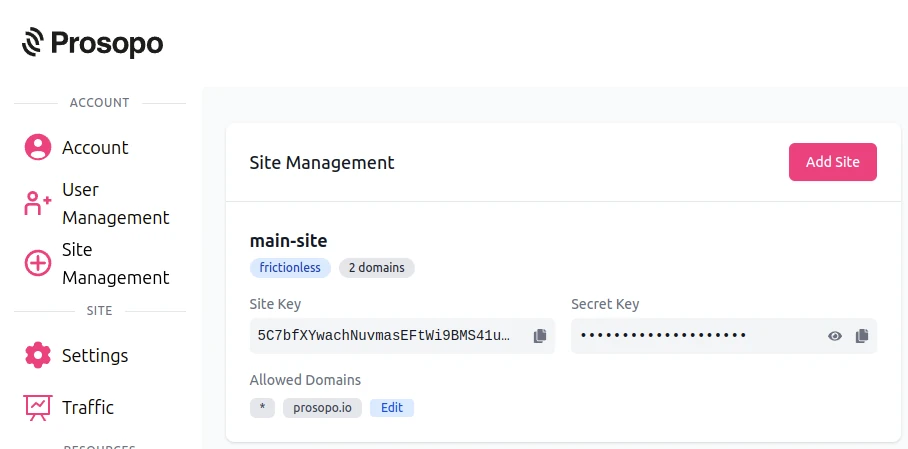
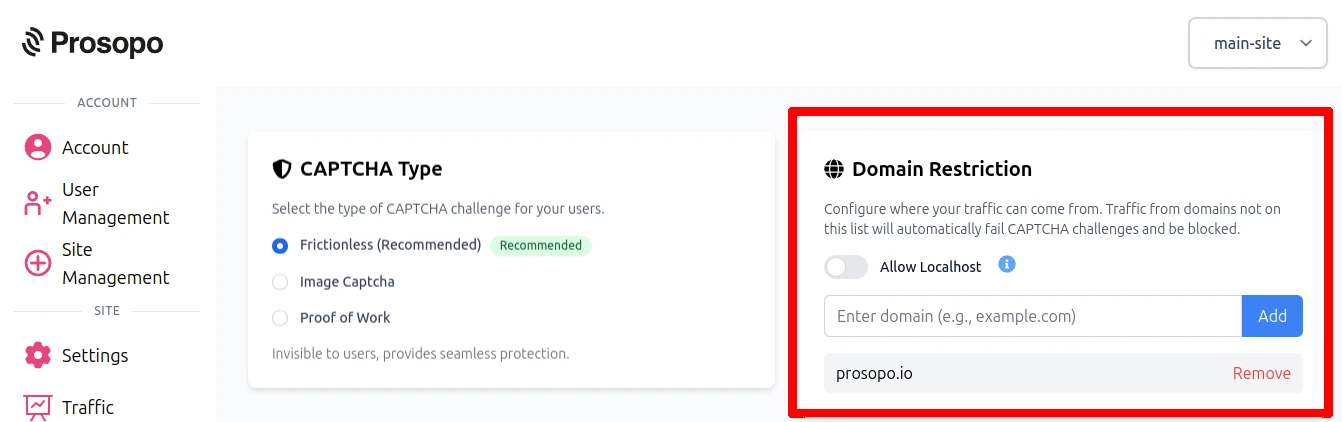
- Add your domain in the Prosopo dashboard, if it is not already present
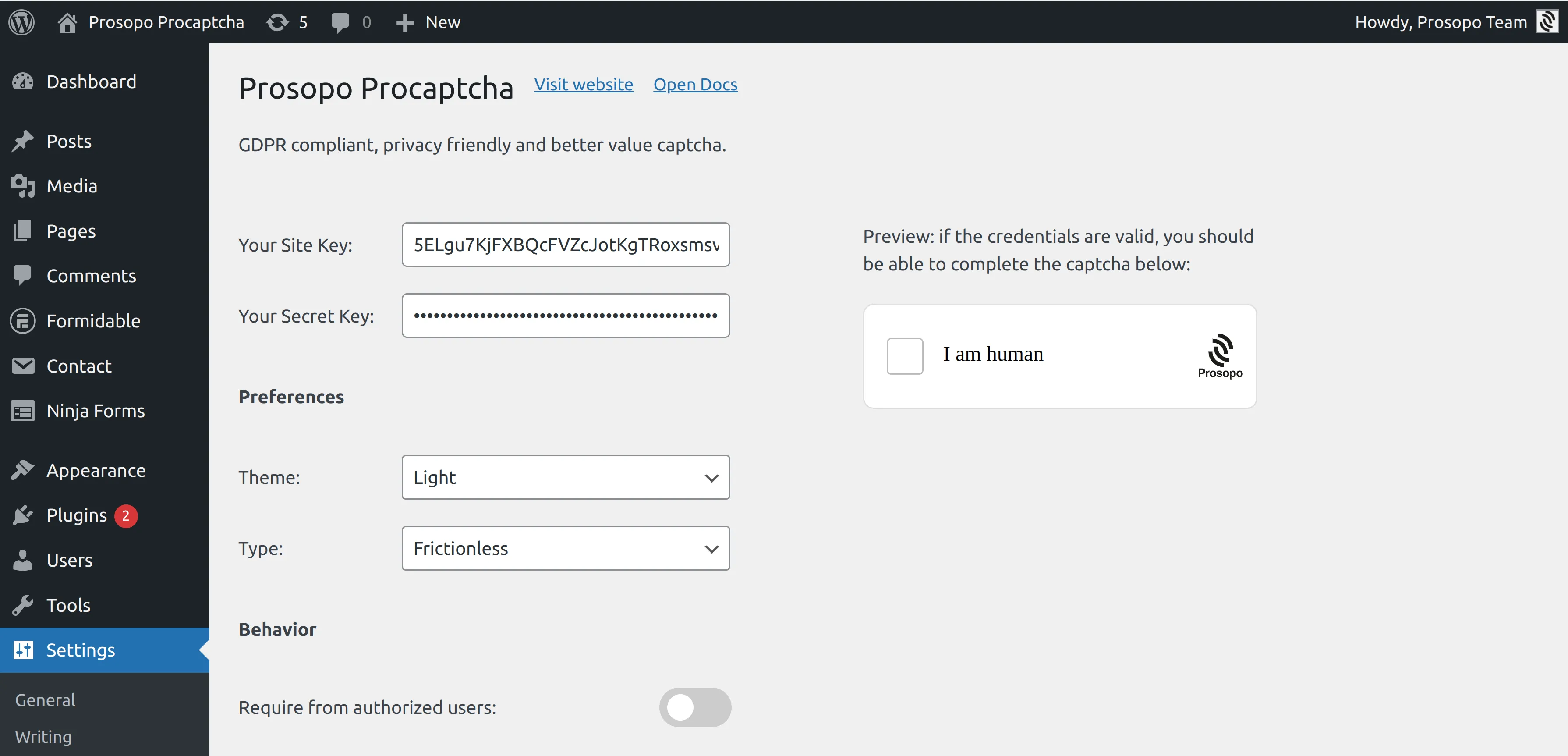
- Add your site key and secret key to the Prosopo WordPress plugin settings. You can find them in Site Management in the Prosopo dashboard.
- From within any Form in Contact Form 7, select "Prosopo Procaptcha".
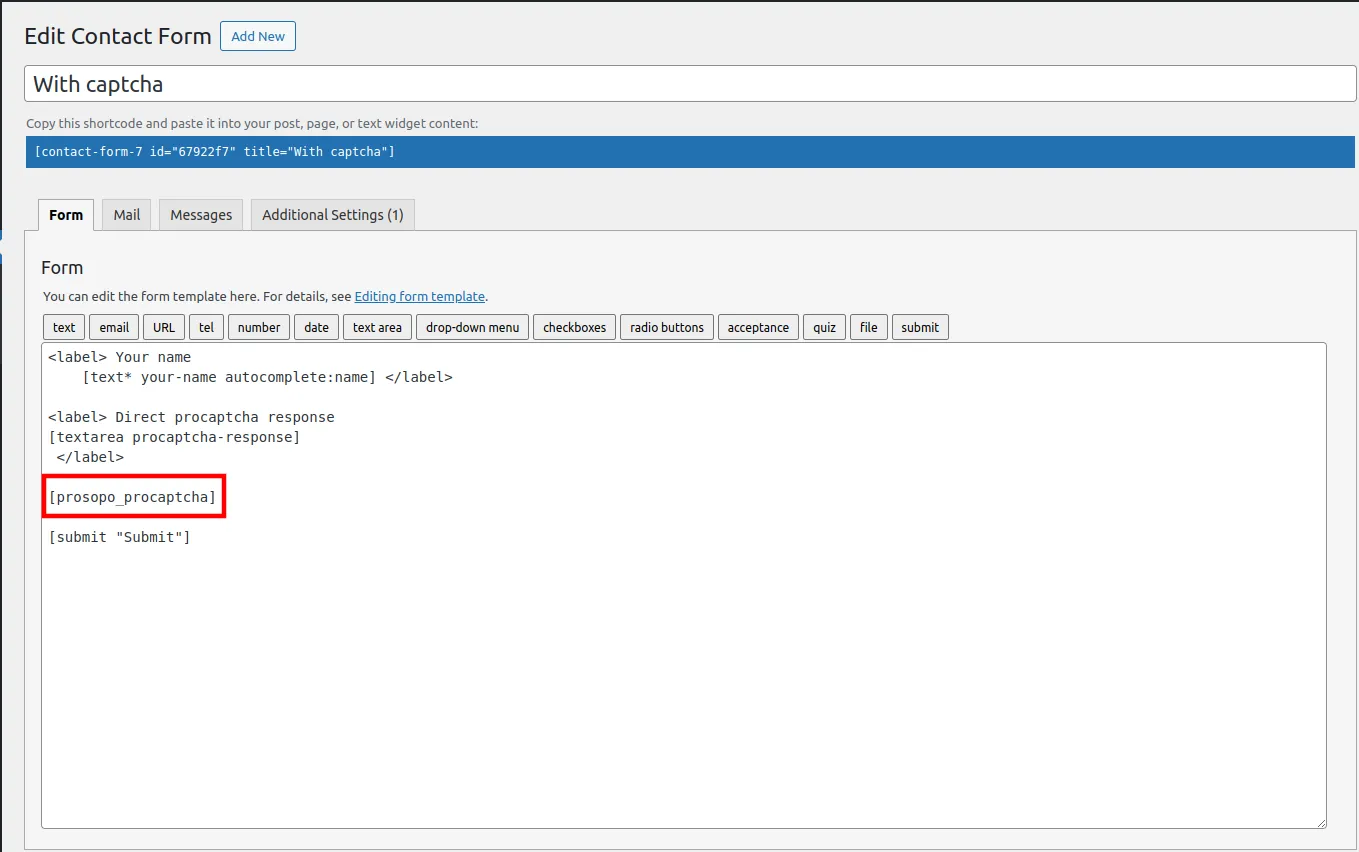
Once you save the form, CAPTCHA will automatically be included in it. Remember to repeat the process for every Contact Form 7 form you want to add CAPTCHA to.
How to check the CAPTCHA is working
Two quick tests before you consider the setup done:
- Load the page in a private/incognito window and confirm the Procaptcha widget renders below the form fields. It should appear on first load without a consent-banner interaction.
- Submit the form as a real user to confirm the CAPTCHA verifies and the CF7 confirmation message appears. Then check the Prosopo dashboard event log — the verification should show up within a few seconds, tagged to your site key.
If the widget doesn't render, double-check that the site key and secret key in the Prosopo plugin settings match the ones from the Prosopo dashboard (a single-character mismatch is the most common cause). If the widget renders but submissions are silently blocked, check the CF7 form's other spam-protection settings — Akismet or a caching plugin is occasionally the culprit rather than the CAPTCHA itself.
Related
- WPForms spam protection — the same setup for WPForms, the other most-installed WordPress form plugin.
- Ninja Forms spam protection, Gravity Forms, Fluent Forms — the other big three WordPress form plugins, same integration pattern.
- Spam bot protection — the broader use case: why your forms get spam and how to stop it across every platform.
- Free anti-spam for WordPress — every WordPress plugin integration on one page, plus Akismet positioning.
- Spam Filter — pair the CAPTCHA with email-pattern and traffic-source filtering (throwaway Gmail/iCloud/Yahoo addresses, VPN/Tor, disposable domains).
- reCAPTCHA pricing calculator — if you're currently on reCAPTCHA and wondering what a busy CF7 form actually costs.
- Best CAPTCHA in 2026 — the wider comparison across every mainstream CAPTCHA option.
Frequently Asked Questions
What is the best CAPTCHA for Contact Form 7 in 2026?
The best CAPTCHA for Contact Form 7 in 2026 is a privacy-first, non-Google option. reCAPTCHA sets tracking cookies without a valid GDPR lawful basis for many EU sites, hCaptcha still shows image puzzles that solver farms clear at commodity prices, and both charge for the volume a busy CF7 form receives once you cross the free tier. Prosopo Procaptcha is free for the first 10,000 verifications per month, needs no cookie-consent banner, and installs in the existing CF7 form-tag flow — no shortcodes, no rewriting your forms.
How do I add a CAPTCHA to Contact Form 7?
Install the Prosopo WordPress plugin from the WordPress.org plugin directory, register for a free Prosopo account, add your site key and secret key to the plugin settings, and then select 'Prosopo Procaptcha' as the CAPTCHA type in any Contact Form 7 form. The CAPTCHA is included in the form automatically once saved. Full step-by-step below.
Is there a free CAPTCHA for Contact Form 7?
Yes. Prosopo Procaptcha is free for the first 10,000 verifications per month with no credit card required and no billing account needed — enough for the vast majority of Contact Form 7 sites. Cloudflare Turnstile is also free at any volume but returns a pass/fail token that modern stealth-headless bots increasingly bypass. reCAPTCHA is free up to 10,000 assessments per month, then $8/month up to 100,000 — see the [reCAPTCHA pricing calculator](/tools/recaptcha-pricing-calculator/) for the full breakdown.
Do I need to replace reCAPTCHA on Contact Form 7?
You do not have to, but three things typically push CF7 sites to switch in 2026: reCAPTCHA sets Google third-party tracking cookies on every page load and needs a cookie-consent banner + DPA entry for EU visitors, reCAPTCHA now bills every assessment above 10,000/month, and modern CAPTCHA solver farms clear reCAPTCHA v3 tokens at roughly $1–$2 per 1,000 — so the CF7 inbox is often full of spam anyway.
Why is Contact Form 7 email going to spam?
Almost every CF7-to-spam complaint has the same root cause: bots submitting the form generate sudden bursts of outbound email from your site, mail providers (Gmail and Outlook especially) flag this volume pattern, and legitimate CF7 email lands in junk. Fix the form with a CAPTCHA and the outbound-email burst stops. Reputation recovers within days.
Does the Prosopo Procaptcha plugin support other WordPress form plugins?
Yes. The single Prosopo WordPress plugin covers Contact Form 7, WPForms, Gravity Forms, Ninja Forms, Fluent Forms, Formidable Forms, Everest Forms, User Registration, MemberPress, bbPress, Beaver Builder and Jetpack. All install the same base plugin and enable the CAPTCHA per-form. See the [WordPress plugins hub](/wordpress/) for the full list.